 Swade
SWADE PLATFORM
One workspace from project kickoff to daily care.
From guided onboarding to ongoing updates, hosting status, and direct support—everything stays in one workspace.
Part 01 • Starting a Project
A guided walkthrough of project onboarding.
This sample shows how business details, branding, assets, and domain information can be organized for a project.
Onboarding • Step 01 of 05
Business & Identity
Business Name
Northline Architectural Millwork
Primary Category
Custom Cabinetry & Commercial Millwork
Service Area
Greater Portland & Pacific Northwest
Public Contact Email
Sample workspace preview
Part 02 • Ongoing Website Management
Check status, request updates, and get support in one place.
Check site status, submit update requests, or open the Visual Editor from one place.
Northline Architectural Millwork
Swade Signature • northlinemillwork.example
Hosting & SSL Active
Visual Editor Access
Update the words and images on your site
On eligible plans, edit supported sections, save your draft and check a private preview before publishing.
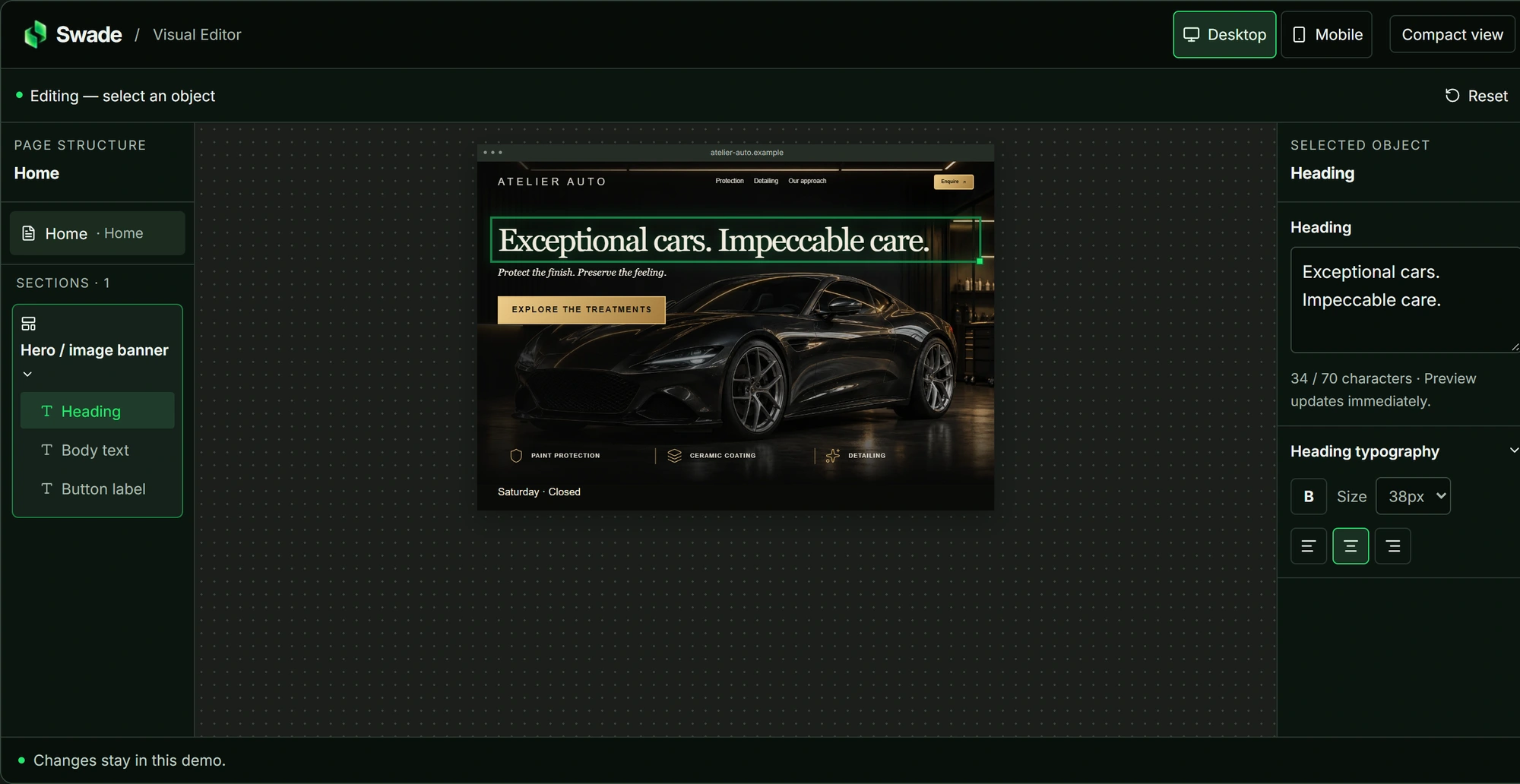
What you can edit
Headlines, service descriptions, call-to-action labels, business hours, and approved text blocks on supported sections.
When Swade steps in
New pages, custom integrations, structural redesigns, or any update you prefer to hand off inside your monthly managed allowance.